
Introduction
The Angular team introduces new features with every version to help developers build faster and more efficient applications. One such feature is Angular Signals, which provides a new reactive system that simplifies state management and makes tracking changes easier and more efficient. When a signal’s value changes, it automatically updates all components that rely on it.
Signals were first introduced in Angular version 16, and as of this writing, Angular’s stable release is version 18.2.2. However, the concept behind signals is not entirely new; frameworks like Solid.js and Vue have similar approaches.
In this blog post, we’ll explore what Angular Signals are, when to use them, and how they differ from other features in Angular.
What are signals?
According to the Angular documentation, a signal is a wrapper around a value that notifies consumers when the value changes. Signals can hold any type of value, from primitives to complex data structures.
Signals work through a getter function, which returns the current value. Angular automatically detects changes in these reactive values and updates their dependencies. Previously, Angular relied on Zone.js for change detection, which scanned the entire component tree whenever something “might have changed.” This approach was often inefficient because even small state changes required checking all components. With Signals, Angular can now track specific state changes. Instead of checking the whole component tree, signals notify the framework about the specific change, allowing Angular to update only the affected parts of the view. This improves state management and reduces unnecessary processing, leading to better application performance.
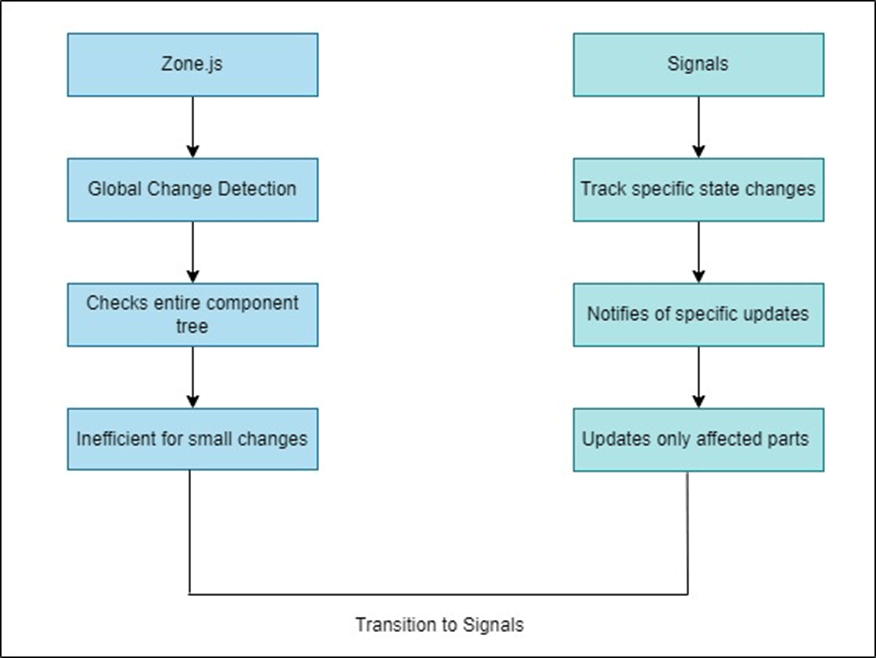
Different Types of Signals
Writable Signals (Mutable Signals)
Writable signals allow you to update the value directly. You can create a writable signal using the signal() function with an initial value, and modify the value using the .set() or .update() methods.

Computed Signals
Computed signals are read-only and automatically derive their values from other signals. You can define them using the computed function, and Angular will efficiently recalculate the value whenever the dependent signals change.
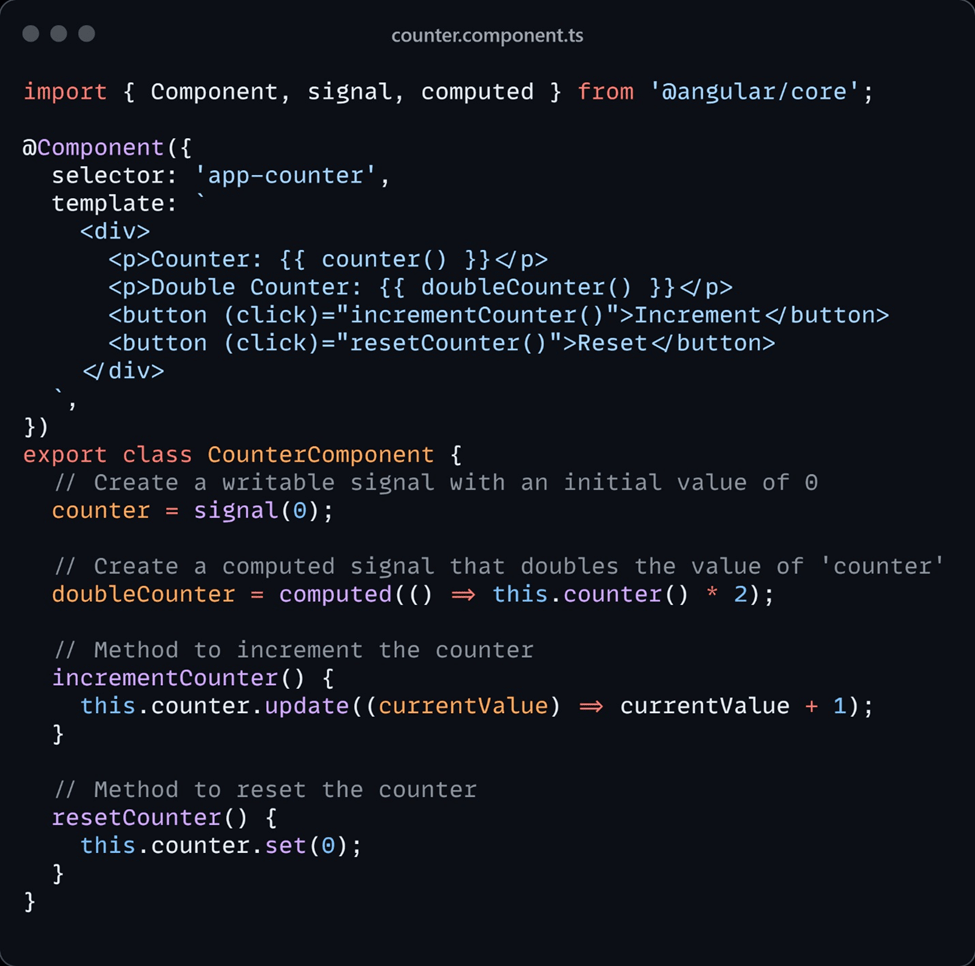
in the counter.component.ts file, the doubleCounter signal depends on the counter signal. Whenever counter updates, Angular knows that doubleCounter also needs to be updated.
Derived Signals
Derived signals allow you to create new signals based on the values of existing signals. A derived signal automatically updates whenever the signals it depends on change, making it ideal for creating dynamic and responsive applications.
Although similar to computed signals, derived signals are typically used for simpler, direct relationships, while computed signals can involve more complex logic or transformations.
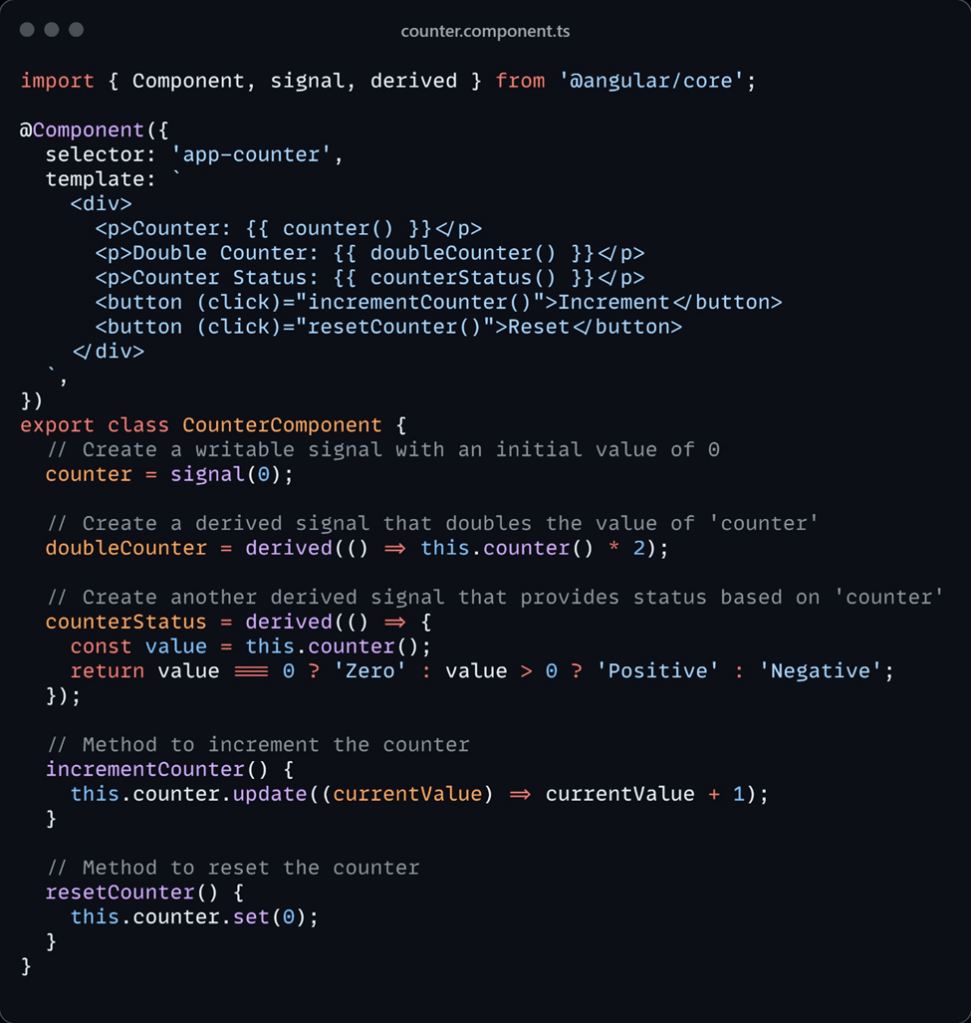
Read-only Signals
Read-only signals expose state without allowing external modification. They are particularly useful for maintaining encapsulation and preventing external components or modules from altering a signal’s value.
In our CounterComponent example, we can create a read-only signal that allows components to observe the counter value without the ability to modify it.
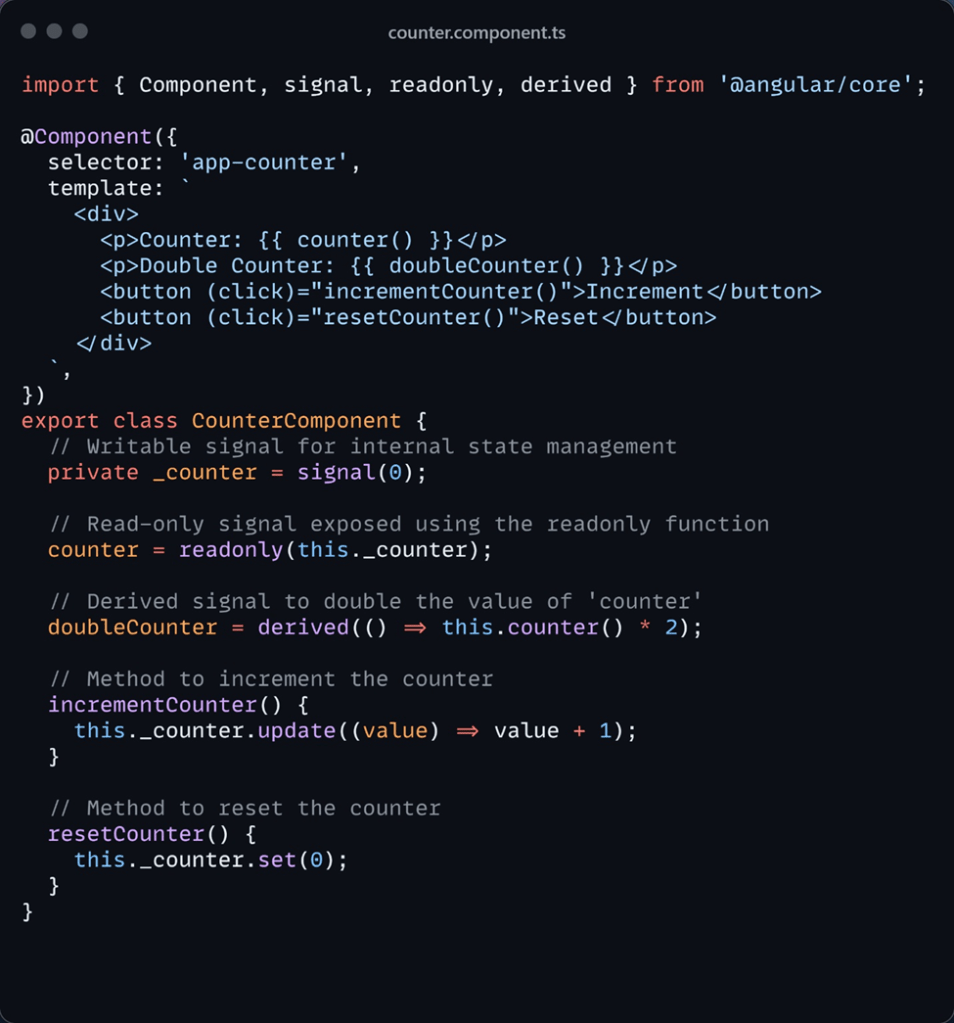
the private _counter is writable and managed within the component, while the public counter signal is read-only, ensuring control over updates.
Effect Signals
Effect signals trigger side effects (like API calls, DOM manipulations, or logging) when one or more signal values change. They are created using the effect function. Similar to computed signals, effects dynamically track their dependencies and re-run whenever those dependencies change. However, effects execute asynchronously during the change detection process.
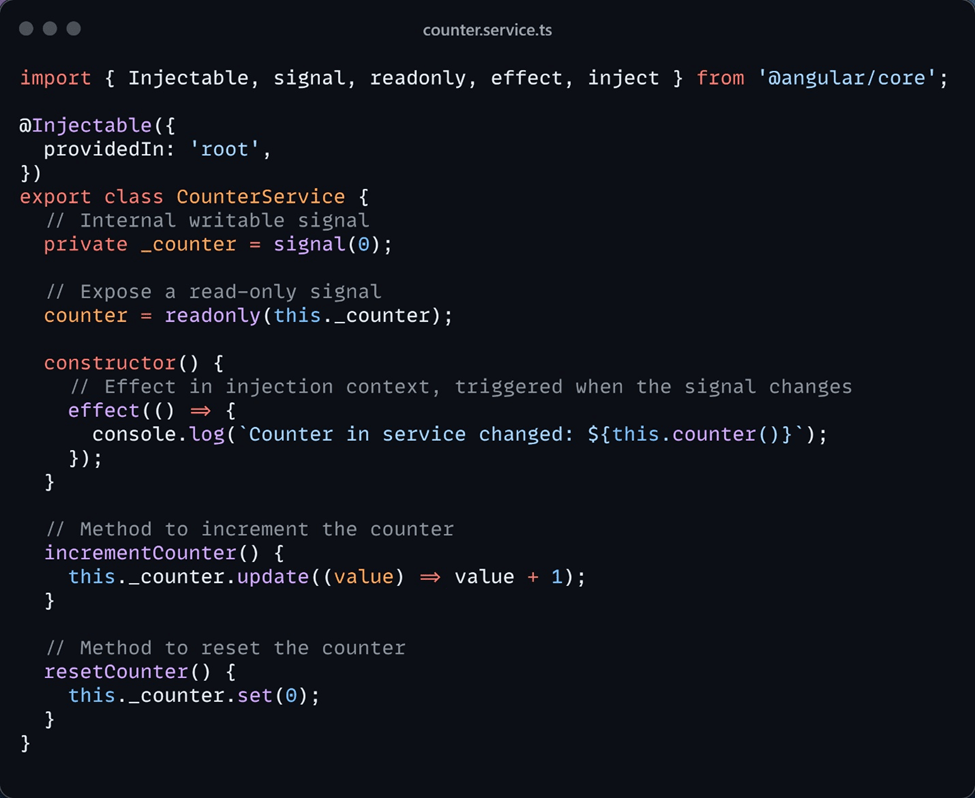
Using Signals and Effects in Angular’s Injection Context
In Angular, signals can be integrated into the injection context, enabling their use in services or injectables for managing state throughout the application. Effects listen for signal changes and trigger side effects when the signal is updated. When signals are used within a service, Angular’s injection system ensures proper functioning of these effects, providing centralized and reusable state management across components.
Let’s modify the previous example to demonstrate how signals and effects work within an Angular service.
Counter component using the service
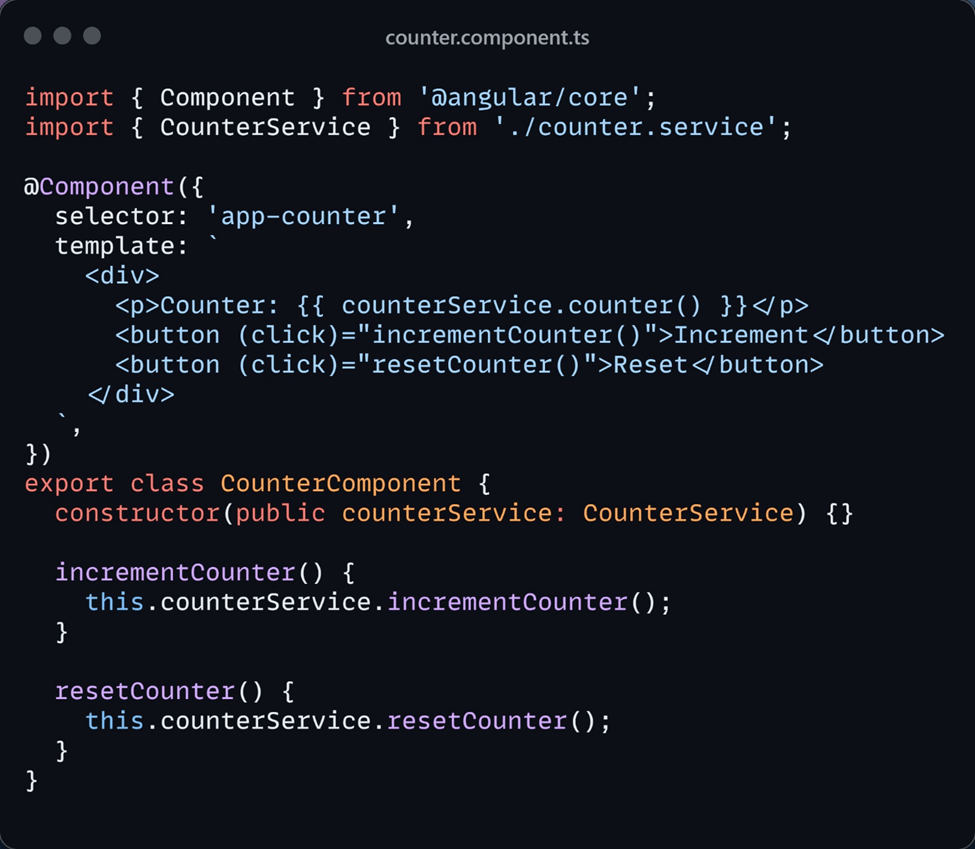
This setup ensures:
- Shared State: Signals in the service allow components to easily share and synchronize state.
- Centralized Logic: Effects handle side effects like logging or API calls in a centralized and reusable manner.
- Encapsulation: The read-only signal ensures that only the service can modify the counter value, maintaining control over state updates.
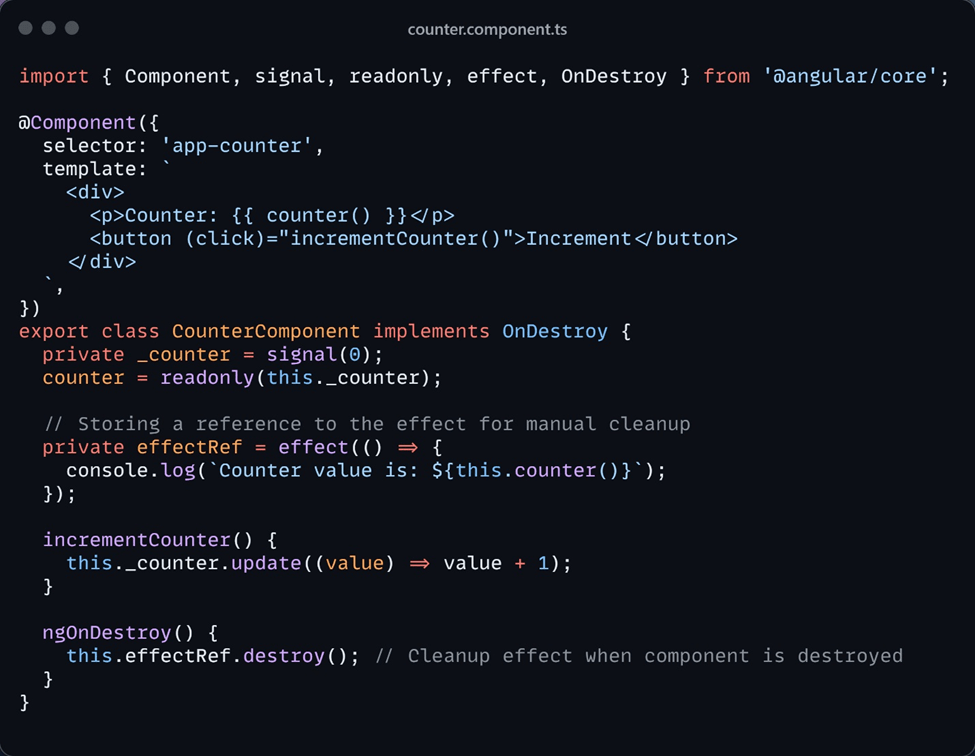
Effects automatically clean up when the component or service is destroyed. However, if you want more control, you can manually destroy them by using lifecycle hooks like ngOnDestroy.
When to Use Angular Signals
- Component State Management: Signals are ideal for managing component-level state, especially when a reactive approach is needed for small-scale, localized state management without complex libraries.
- Simpler State Reactions: Signals provide a declarative and simplified way to react to state changes. They automatically trigger UI updates when the value changes.
- Reactive Computations: Use computed signals for derived data that automatically updates based on other signal values, such as computing totals from form inputs or dynamically filtering data.
- Side Effects: Effect signals are ideal for triggering side effects like API calls, DOM manipulation, or logging in response to state changes. They simplify the handling of side effects without requiring manual subscriptions.
- Efficiency in Change Detection: Signals optimize change detection by tracking dependencies and only triggering updates when necessary, significantly reducing the overhead in large applications with complex data flows.
- Smaller Reactive Use Cases: When a full-fledged state management solution like NgRx or RxJS isn’t required, signals provide a lightweight alternative for reactive data flow.
How Angular Signals Differ from Other Angular Features
Signals vs. RxJS Observables
- Signals:
- Synchronous, automatically update the UI, and don’t require manual subscriptions or unsubscriptions.
- Use Signals for simple, synchronous state management.
- RxJS Observables:
- Asynchronous, subscription-based, and better suited for handling event streams over time.
- Use RxJS for handling asynchronous operations like HTTP requests, WebSockets, or event streams.
Signals vs. Angular Change Detection
- Signals:
- Track their own dependencies and update only the affected components, offering more granular control.
- Use Signals for fine-grained, reactive control over component re-renders.
- Angular’s Default Change Detection:
- Runs for every asynchronous task, which can lead to performance bottlenecks in larger applications.
- Use Angular change detection for simpler applications where detailed control isn’t necessary.
Signals vs. NgRx (Redux-like State Management)
- Signals:
- Lightweight and ideal for localized state management, especially for small or medium-scale applications.
- Use Signals for localized, component-level state management.
- NgRx:
- Redux-inspired global state management, suitable for large, complex applications with more extensive state needs.
- Use NgRx for global, predictable state management across your application.
Signals vs. @Input()/@Output()
- Signals:
- Better suited for managing internal component state or sharing reactive state across sibling components.
- Use Signals for local, reactive state management within a component.
- @Input/@Output:
- Useful for parent-child communication when you don’t need reactive state.
- Use @Input/@Output for simple, unidirectional data flow between parent and child components.
Conclusion
Angular Signals provide a powerful and efficient way to manage state reactively, simplifying state management and improving performance. They offer a lightweight, declarative approach for handling component state, reactive computations, and side effects, making them a strong alternative to more complex solutions like RxJS and NgRx. For developers looking to streamline state management while optimizing performance, Angular Signals are a valuable addition to the Angular ecosystem.


 Tech Realm
Leave a comment